
Free Data Importing Services
How to use the SoftMouse.NET Free Data Importing Tool
SoftMouse.NET's Data Import tool allows you to upload your colony data so that you can get started with your colony data, where you left off with your old system or sheets.
To upload your data, please see the below instructions:
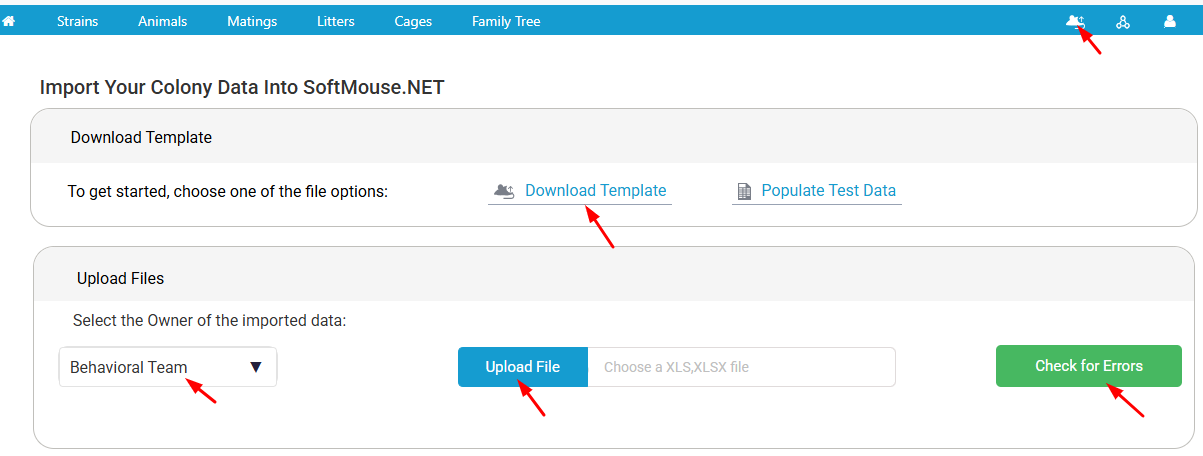
- In SoftMouse.NET’s Colony Module, click on the Data Import icon.
- Download our import template
- Fill in the template with your colony data following these instructions.
- Select the User who will own the imported Data
- Upload your completed template.
- Click the “Check for Errors” Button
SoftMouse.NET’s Data Analyzer will review your import and catch any data discrepancies. If the Data Analyzer finds anything, you will receive a report that explains the Error or Warning.
Note: Errors must be corrected before proceeding. Warnings can be imported but are recommended changes to your data’s formatting for an optimal experience. If you are unclear on how to correct your data, please review the Data Import Warning and Error Chart. - Once all errors are corrected, re-upload your datasheet and check for errors again
- Follow the prompts confirming your upload
All done! Your data is now securely imported into SoftMouse.NET.
To help you easily get started with SoftMouse.NET digital colony and study management software, HERE is a prior recording of the Getting Started with SoftMouse.NET webinar!
You are also welcome to join us on a future webinar (every second Thursday @ 1 PM EST) by registering HERE.
If you have any further questions, please contact us with your inquiry.