
How to Deactivate a Mouse Record
When a mouse is no longer active in your colony - either it was euthanized, died, or was transferred to another user, etc. - you can use the End Mice function to mark the record as inactive.
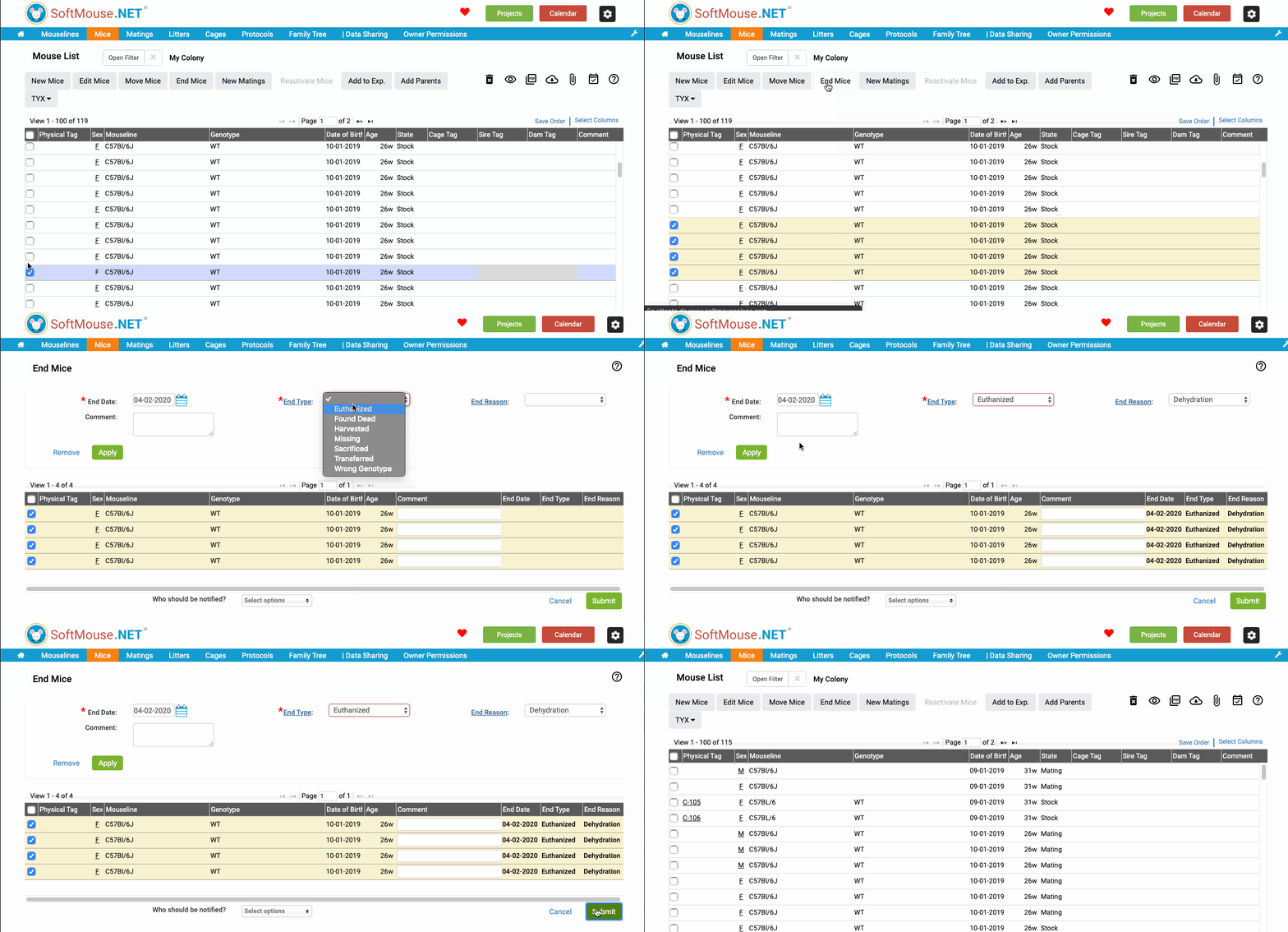
To end a mouse, follow these steps:
- Go to your Mouse List.
- Select one or all mice that are being deactivated.
- Click End Mice.
- On the End Mice page, enter the End Date on which the mouse records were deactivated.
- Enter the End Type --- i.e. how the mouse is being ended. Note you can click on the End Type link to add additional content to the End Type drop-down list.
- Enter an End Reason if you desire --- this is not a required field but you can use it to add more detailed information if needed.
- Select the mice in the list generated.
- Click Apply --- you will see the end information in the Mouse List End columns.
- Click Submit.
The mice will be marked as ended, and will automatically be removed from their current cages/mating records where applicable, and will be archived.
If you want to find the ended mice, you can easily locate them by following these instructions: Filtering your Mouse List for Ended Mice
If you have any further questions, please contact us with your inquiry.