
How to Access Inactive User's Data
As the lab administrator of your SoftMouse.NET account, you can maintain access to an inactive user's data by following these steps:
- Click the home icon on the left side of the menu bar
- Click the Users tab in the grey bar
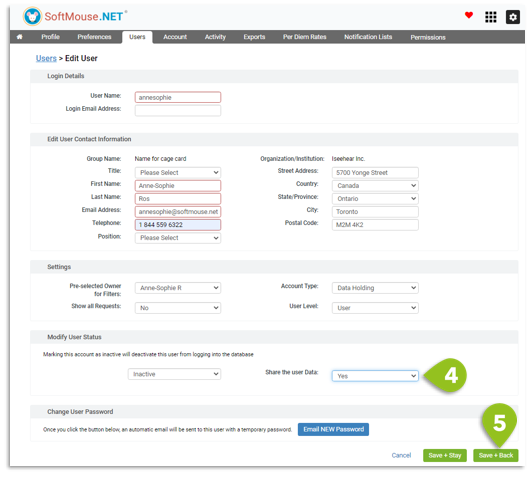
- Click the user's name --- If the user is currently active, click on their name in the user page. If the user has already been deactivated, use the drop down to search for inactive users before clicking the name.
- In the "Share the user Data" drop down, select Yes
- Click Save + Back
Done!
The inactive user can no longer login, but this will allow you to check their data without transferring the records, ie keeping them where they were originally for historical tracking purposes.
To access their records, their name will reappear on the Home Page as well as in the Owner drop down lists in the Filters.
If you have any further questions, please contact us with your inquiry.