
How to Get a List of Unweaned Pups
There are two options to see a list of unweaned pups.
Option 1: Via the Mouse List
You can easily get a list of all pups using the Mouse Filter as follows:
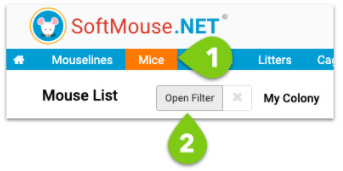
- Go to the Mouse List
- Click Open Filter
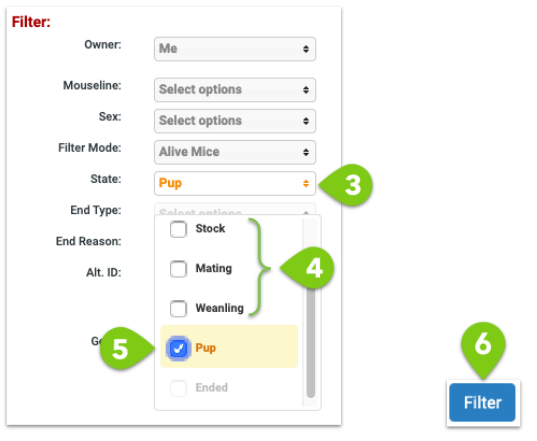
- Open the State drop down filter parameter
- Unselect the check boxes for Stock, Mating and Weanling
- Select check box for Pups
- Click Filter
Now you will see a list of all your unweaned pups.
Option 2: Via the Litter List
You can easily get a list of all pups in the Litter List as follows:
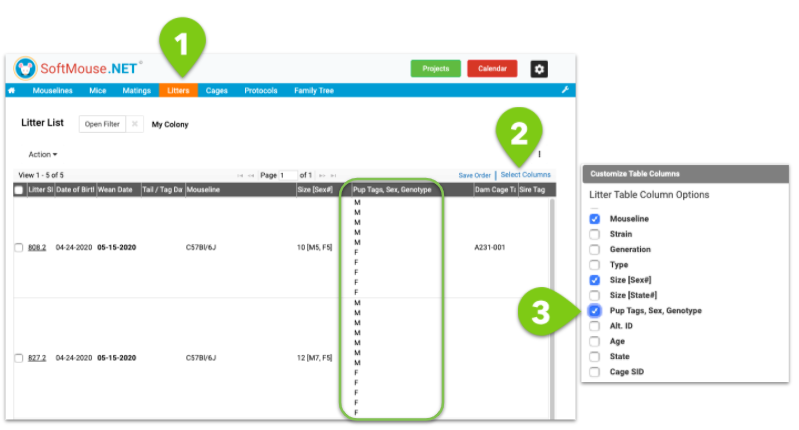
- Go to the Litter List
- Click Select Table Columns
- Click the check box "Pups Tags, Sex, Genotype"
- Click Save
Now you will see all of the pups associated with the unweaned litters in the newly added column
If you have any further questions, please contact us with your inquiry.