
How to Add/Edit Sequential ID
In addition to the Mouse SID, Physical Tag and Alt ID, a Sequential ID can be added to each mouse in a study as a way of uniquely identifying the mice in the specific study.
Here are the steps:
- Go to the Edit Study page
- Click the Animal tab

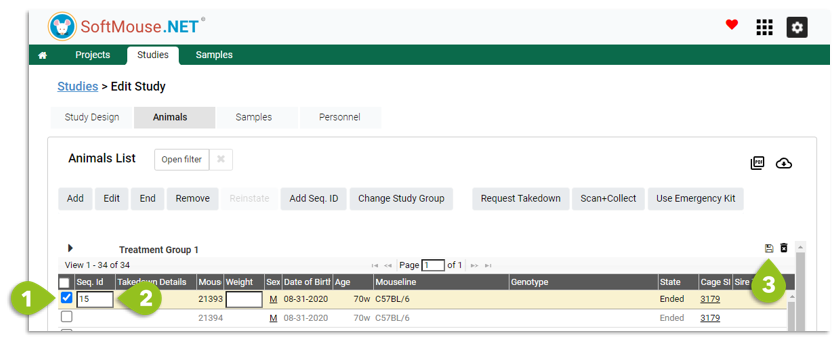
If you want to fill in the Sequential ID one animal at a time, you can:
- Click the check box of that animal in the Study Group Tables
- In the Seq ID box in the table itself, enter the ID number
- Click the Save icon at the top right of the list table
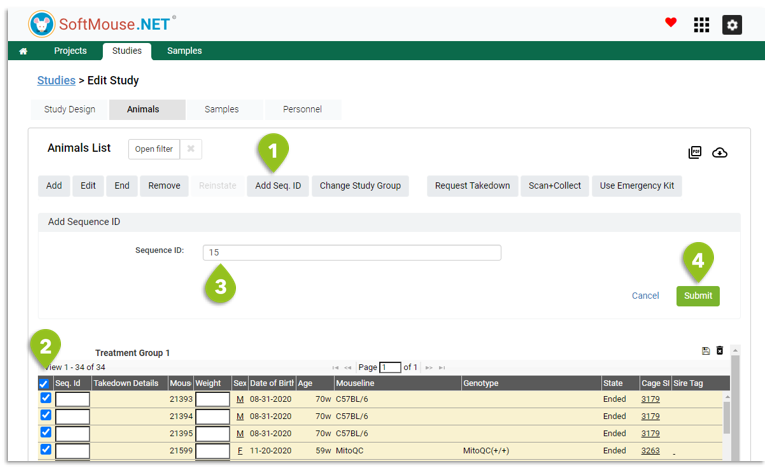
If you want to fill in the Sequential ID for multiple animals at a time, you can:
- Click the Add Seq. ID button
- Select all checkboxes of animals in the Study Group tables that need the Seq. ID
- In the text box at the top, enter the starting number
- Click Submit to sequentially add all the ID numbers to the selected animals
NOTE: You cannot use the same Seq ID within a Study for 2 different animals.
To Edit a Sequential ID: you simply need to select the animal in question (feel free to filter for it in the Filter on the Animal Tab), modify the Seq. ID directly in the table and click the Save icon at the top right of the list.
If you have any further questions, please contact us with your inquiry.