
How to Enter a Takedown Request
When you have decided on which animals will be taken down and with which schema, you can enter a Takedown Requestin order to create your digital samples.
Here are the steps:
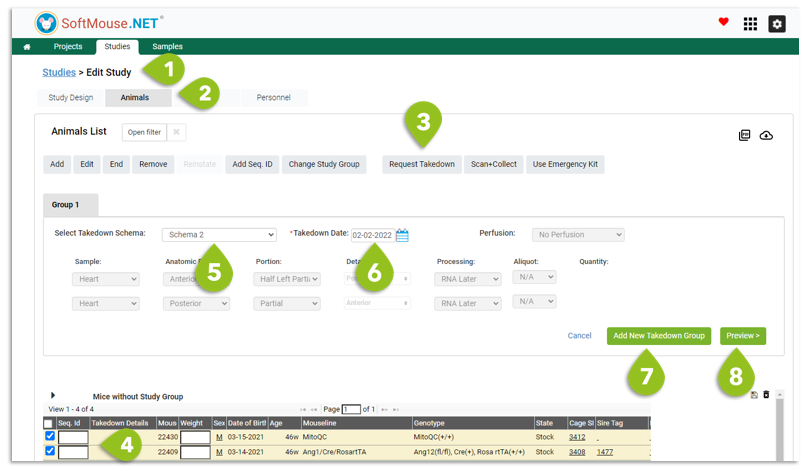
- Go to the Edit Study page
- Click Animals tab
- Click the Request Takedown button
- In the Study Group tables below, select the animals that will have the same takedown schema and takedown date --- use the filter to narrow down the animals if needed
- Choose a Schema from the drop down --- this will pre-populate the samples to be collected based on your Study Design
- Enter a Takedown Date
- If you will be doing another takedown with another set of animals, following a different takedown schema or on a different date, click Add New Takedown Group and repeat steps 4-6
- Click Preview to review your inputs
9. If you would like to notify any user or group that the digital samples have been created, select their name or notification group from the "Who should be notified" drop down list
10. Click Submit to generate your digital samples
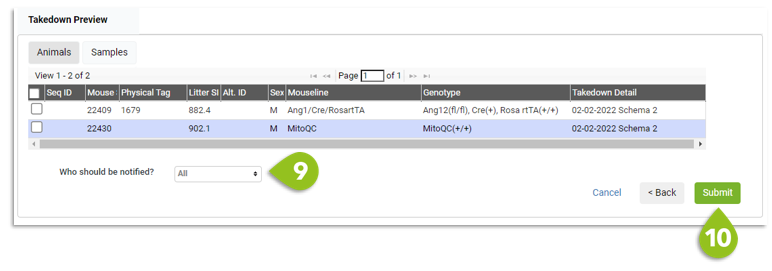
Done! Now when you visit the Samples tab, you will see the list of samples pending collection. Tube labels can then be printed to get everything set up ahead of the takedown.
If you have any further questions, please contact us with your inquiry.