
How to Find Samples Planned to be Collected on a Specific Date
If you need to locate a list of samples that are planned for collection on a specific date, you can easily filter for them on the Samples list and then print out the labels or even export them into a spreadsheet if needed!
Here are the steps:
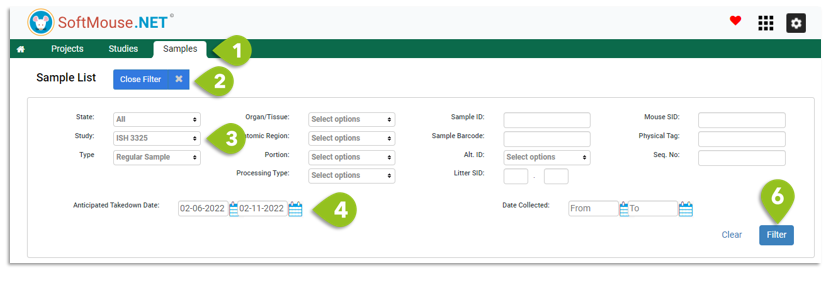
- Go to the Samples List
- Open the Filter
- Select the Study of interest from the Drop down
- In the Anticipated Take Down Date calendar range, enter the dates of interest --- if you are looking for a specific date, enter the same date in the From and Ro calendars
- Use any other filter parameter to narrow down your search
- Click Filter
Done!
Select the records of interest and click Print Labels to print out the labels in question.
If you want to export the results, you can click the Arrow in Cloud export icon at the top right of the list to extract the dataset into a spreadsheet format.
If you have any further questions, please contact us with your inquiry.