
How to Assign Tasks to Users?
Here are the steps to follow:
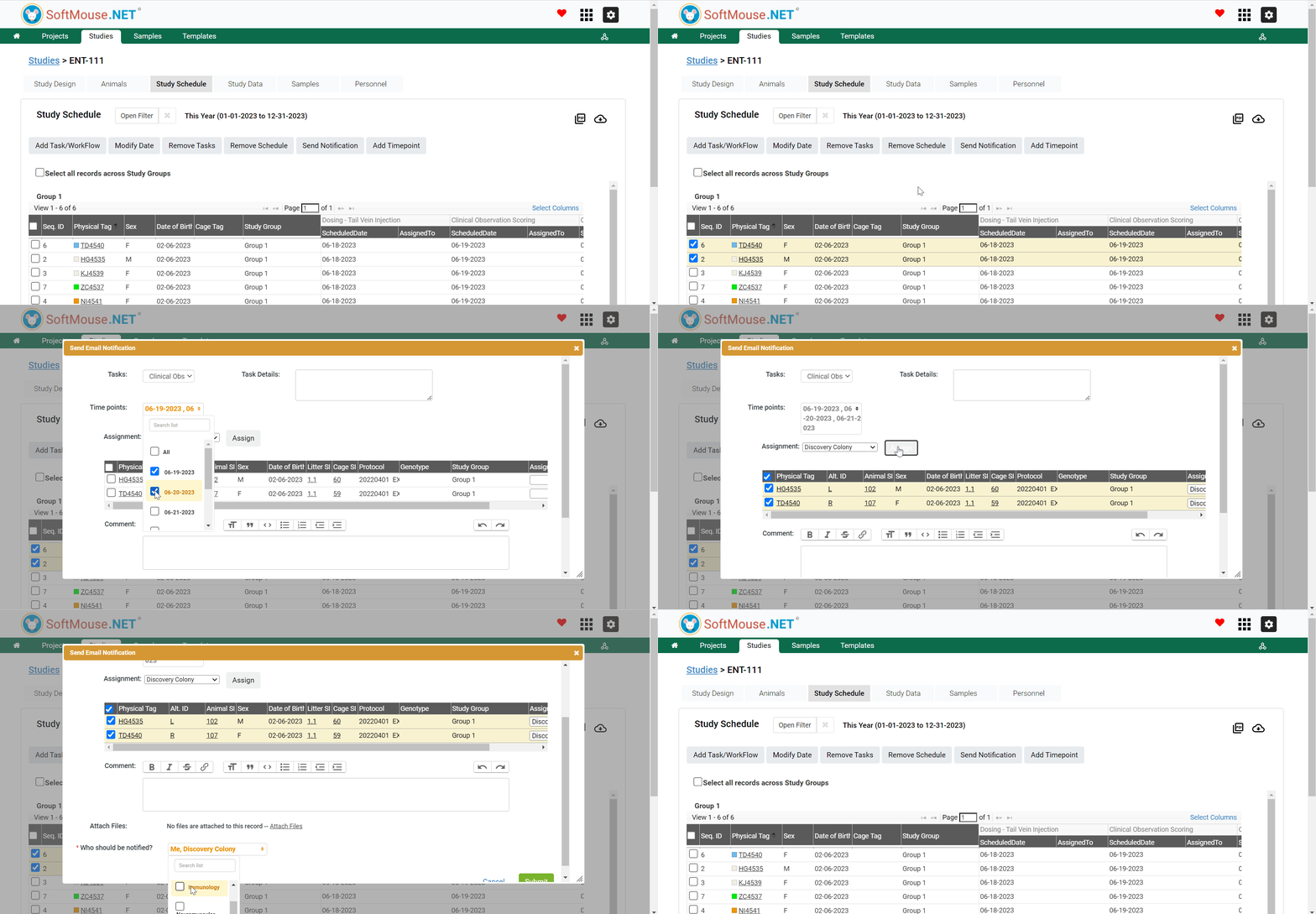
- Go to the Study Schedule page
- Select Mice records you want to Assign their respective Tasks to Users
- Select all records across Study Groups
- Select all Animals in a given Group(s)
- Select some Animals individually - Click Send Notification
- In the pop up box in the Task field, select the task you want to assign in the drop down list
- In the Time Point field, select the Time points you want to assign to the User
- In the Assignment field, select the User you want to assign the Task to
- Select the Mice you wish to assign their Task
- Click Assign button
- In the Comment field, Add a Comment if needed (optional)
- Click Submit
All set!
Following the aforementioned steps you will be able to assign Tasks to Users and they will receive an email notification with the Assignment details.
Tip! You can select Users in the Who should be Notified drop down list to keep your other team members informed about the Tasks Assignment.
If you have any further questions, please contact us with your inquiry.