
How to Reassign a Litter to a New Mating
If you accidentally add a litter to the incorrect Mating record, you can easily reassign the litter to the correct mating as follows:
- First, make a note of the Mating SID containing the correct parents --- you can easily find the Mating SID of a mating record at the top left of the Edit Mating page
- Then go to the Litter List
- Select the Litter in question
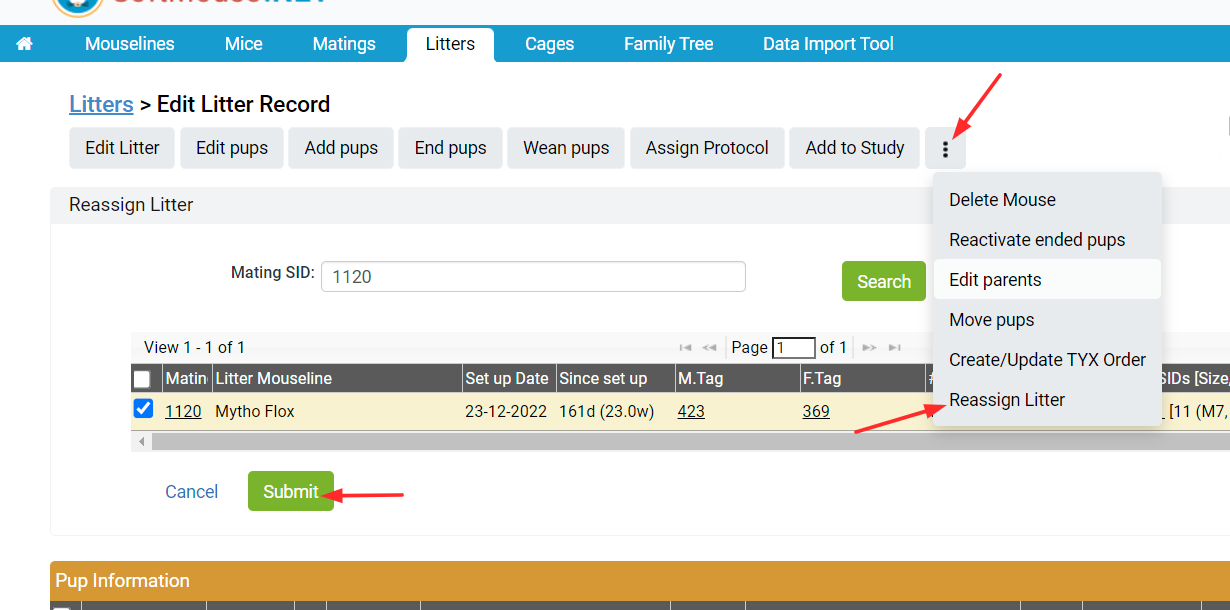
- On the Edit Litter page, click the 3 vertical dots
- Select the Reassign Litter option in the drop down menu
- Input the Mating SID from step 1
- Click Filter --- The Mating record will display and be auto-selected
- Click Submit
Done!
Now the Litter will be moved into the correct Mating Cage and the Litter SID will update to reflect the correct Mating.
NOTE: If you are are seeing any results after clicking Filter in Step 7, it is most likely due to a permission setting on your account which is not allowing you to edit the Mating SID in question. Please contact your SoftMouse.NET admin to gain access or reach out to [email protected] for further assistance.
If you have any further questions, please contact us with your inquiry.