
How to Transfer a Mouseline
To transfer an entire Mouseline to another user, you must move the associated animals from that Mouseline to the new user. Here are the steps to transfer a Mouseline between users in a group:
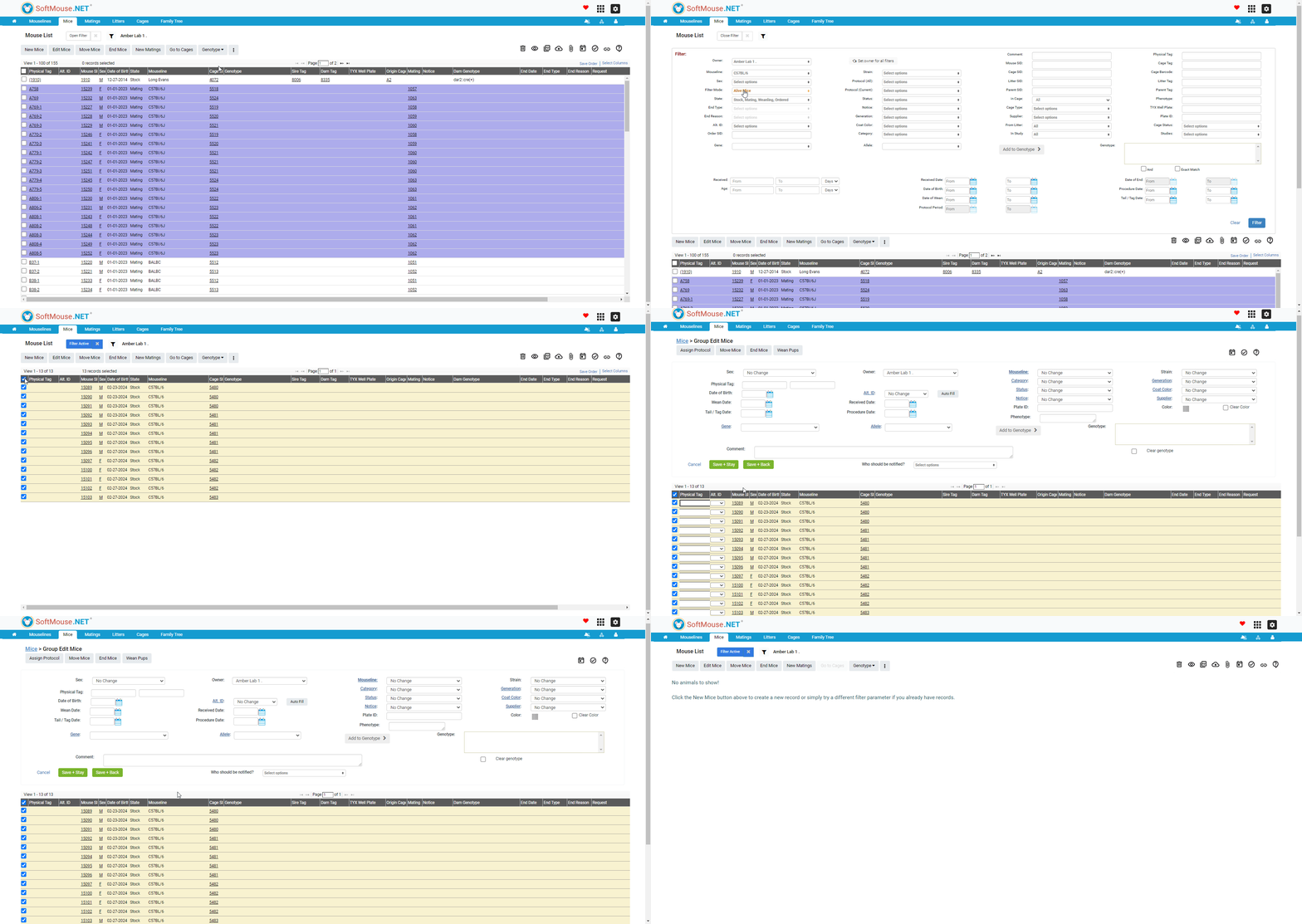
- Go to the Mouse list
- Open the Filter
- Under the Mouseline drop-down, select the Mouseline in question
- Under Filter Mode:
- If you want to transfer alive and historical records - Choose 'All'
- If you wish to transfer only the alive animals - Leave the Filter Mode as 'Alive Mice' and also in the State drop-down select 'Pups'
- Click Filter
- On the populated Mouse list, select the first 100 mice in the list
- Click Edit Mice to go to the Group Edit Mouse page
- Change the owner of all mice in the list using the Owner drop-down list
- Click Save+ Back --- you'll notice that your list will be shortened reflecting that the selected mice have been transferred. If there were less than 100 mice in the line, the list will show as no record, indicating that the line has been successfully transferred
- Repeat steps 3 to 6 until there are no more mice in your list
- You can then go to your Mouseline list and archive the line if you need to.
Done! Now the mouseline, including all records (or all alive records) will be transferred to the new user.
If you have any further questions, please contact us with your inquiry.