
SoftMouse.NET Family Tree: How to Trace an Animal's Ancestry and Breeding History
Every Animal Record in SoftMouse.NET allows you to view the historical information that animal's parents, siblings, and progeny from a lineage point of view, but what if you want to trace back more than just one generation or get a better visualization of the animal's lineage (eg. for crossback, multi-strain breeding, etc.)?
The Family Tree lets you trace backward or forward multiple generations and creates a family tree of your animals to give you a better understanding and visual confirmation of breeding history and familial ancestry.
There are two ways to access an Animal’s Family Tree:
- From the Animal Record.
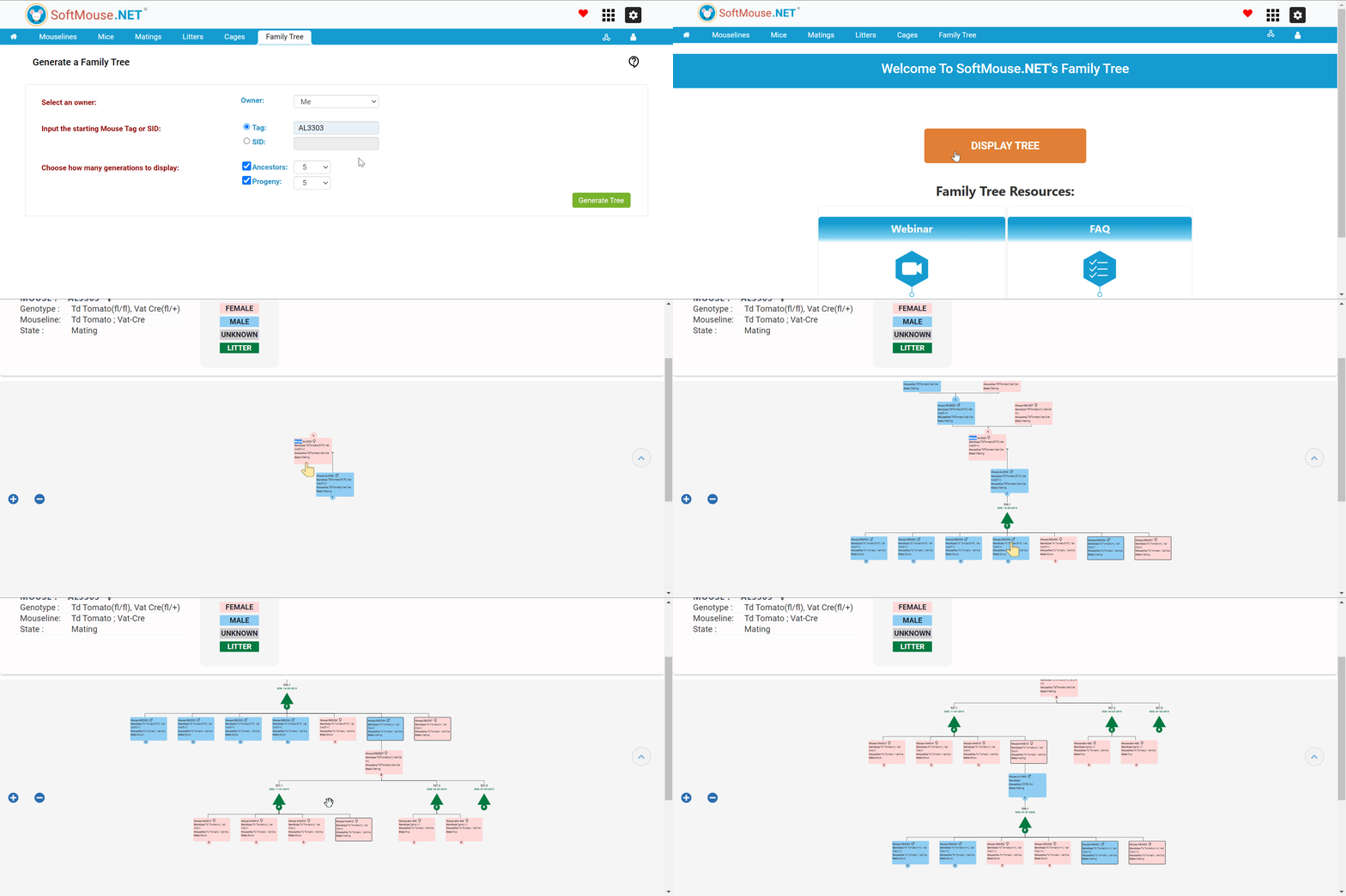
On the Animal Record, you will see the button “Generate Family Tree”. Clicking on this button will take you directly to the Family Tree application.
- From the Family Tree Tab in the Colony Module:
- Select the user who owns the mice you wish to review in the Owner drop-down.
- Input the starting Animal Tag or SID
- Choose how many generations to display for in both the Ancestors and Progeny drop-downs
- From here, click on the green "Generate Tree" button -- this takes you to the Family Tree application
On the "Generate a Family Tree" Page:
- Click the blue "Display Tree" button
- This will display your starting Animal, showing the Animal Tag or SID, Gender, Genotype, Strain, and State.
Note: If the animal has any Ancestors or Progeny, there will be a numbered circle on the top or bottom of the Animal Record. - Click the numbered circle on the top of the Animal Record to display the Ancestry of the Animal.
- Click the numbered circle below the Animal Record to display the animal's Progeny.
Note:- Each litter/clutch is represented by a Green Triangle.
- Each litter/clutch will have its own numbered circle which represents each offspring born from that particular litter/clutch.
- Clicking the green triangle will populate each offspring's information.
If you have any further questions, please contact us with your inquiry.