
Default Genotype Associations
If you manage Mouselines where the genotype is known in advance (e.g: WT line, homozygous line, knockout lines, etc.), it creates extra work to manually enter the same genotype each time for each new mouse entered.
SoftMouse.NET makes it easier for you to personalize your account more than ever with the addition of the Mouseline-Default Genotype association. With this feature, you can set a default genotype for all mice created as new mice or pups (litters in the system) so that the genotype automatically populates for you.
Here are the set up steps:
- Go to the blue menu header and click on the small Association Icon on the upper right-hand side
- Click on "Mouseline - Default Genotype" to create or edit an association
- Select the owner for the corresponding association
- Click on the Mouseline that you would like to associate to a default Genotype
- Select the Gene and Allele
- Click the gray Add to Genotype button to add the Genotype
- Repeat steps 5 and 6 if there are more than one gene in the genotype
- Click on the green "Save" button to save your changes
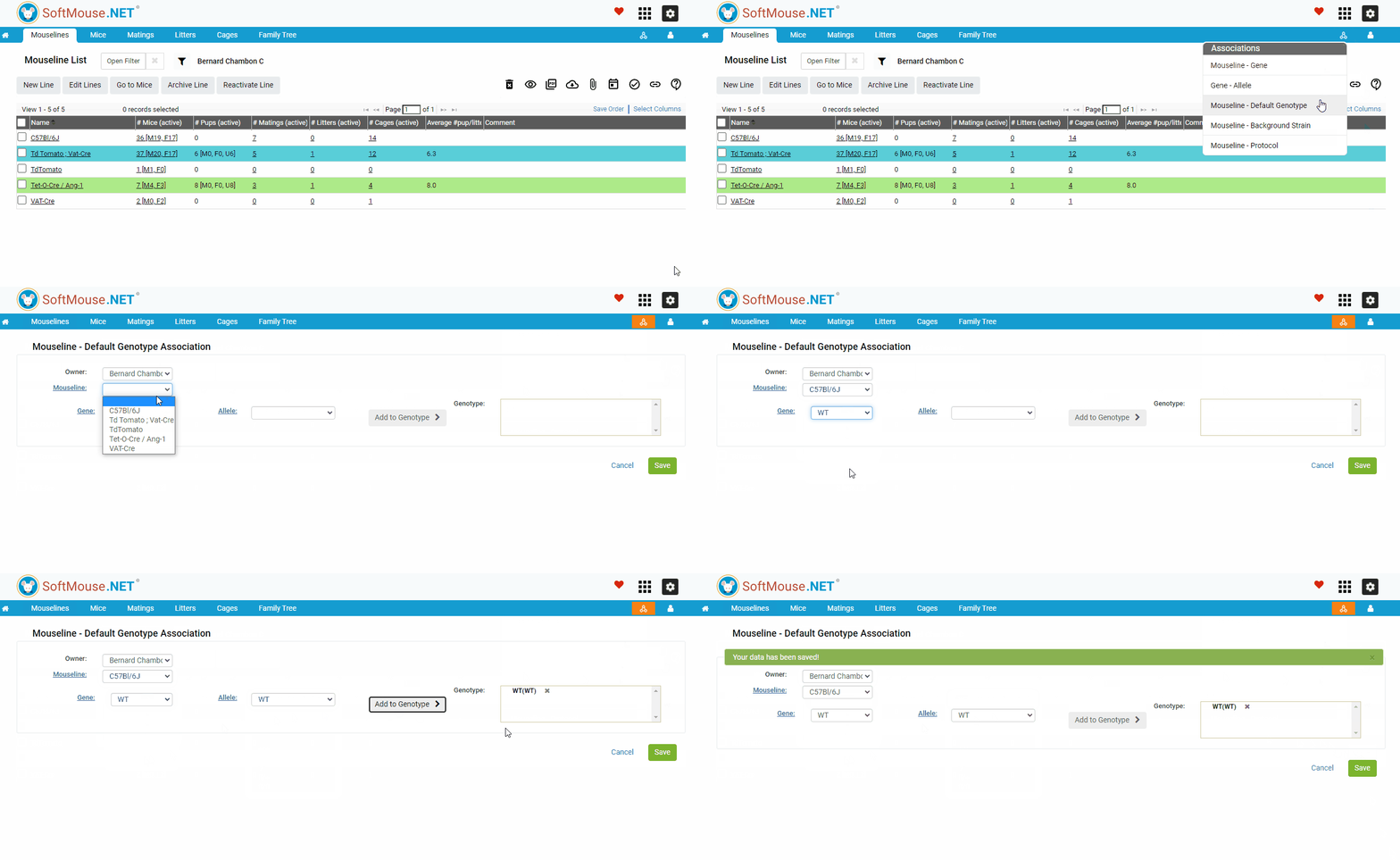
That's it! Now, when you select a Mouseline when creating new mice or pups, the Genotype that you chose to associate with your Mouseline will be added automatically to the mouse’s genotype column, saving you time of having to enter it manually.
If you have any further questions, please contact us with your inquiry.