
How to Reactivate Ended Mice
If you accidentally ended the wrong mouse or cage, you can easily reactivate the corresponding records.
Note cages are reactivated automatically when the animals inside the cage are reactivated. That said, depending on if you know the animal record IDs or the cage records IDs, you can start the process from either the Mouse List or the Cage List.
From the Mouse List:
- Go to the Mouse List
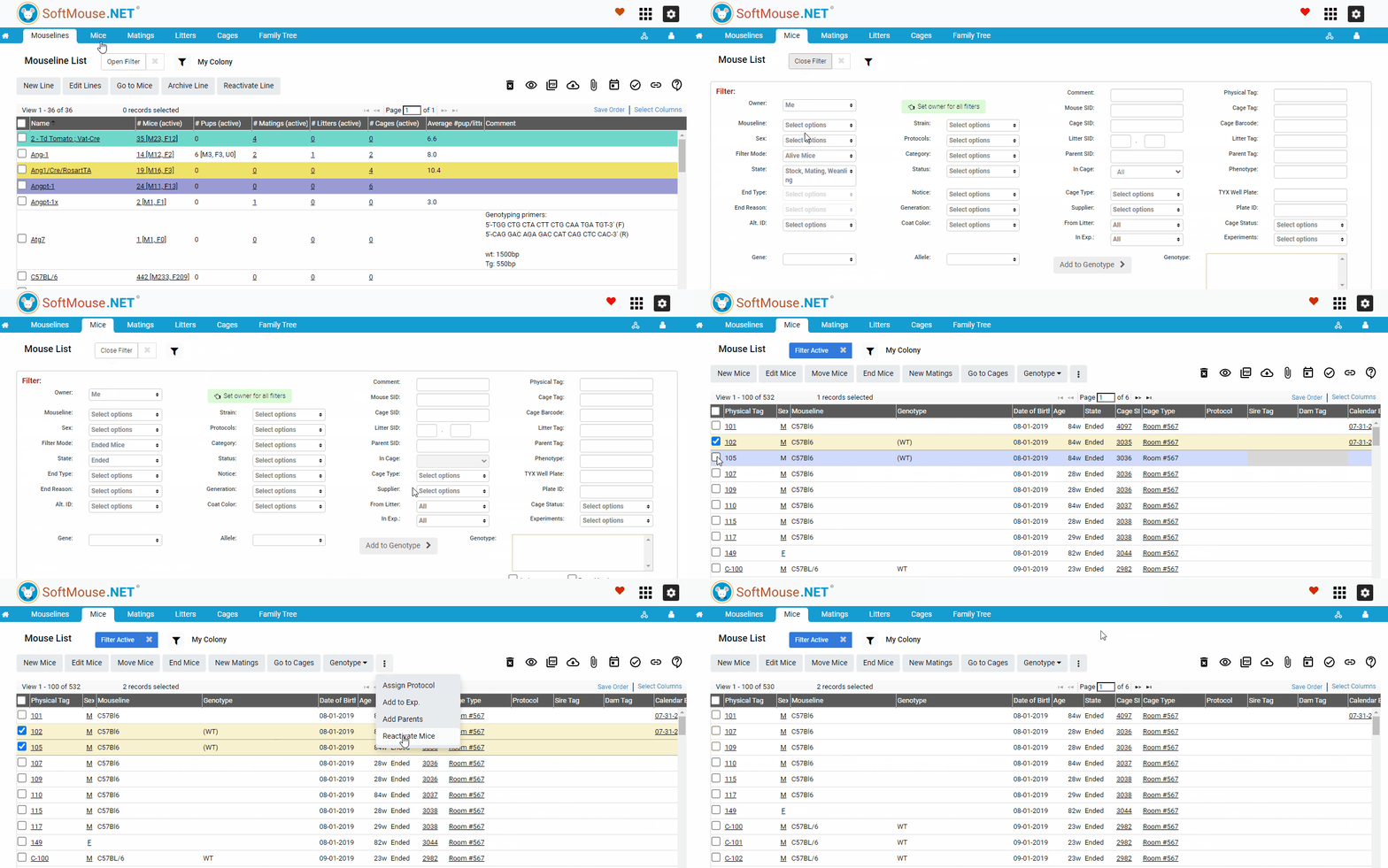
- Click Open Filter
- In the Filter Mode, select Ended Mice
- Click Filter --- feel free to use other filter parameters as well (e.g. End Type, End Reason, End Date, Physical Tag, DOB, etc.)
- Select the desired Mouse/Mice you wish to reactivate
- On the 3 dots Menu, Click Reactivate Mice button
- Click Ok in the confirmation pop up window
NOTE before it was ended, if the reactivated mouse was previously in an active MATING, then the system will automatically reactive its associated Breeding Record in the mating and return the mouse to its last cage.
From the Cage List:
If you know the Cage IDs and prefer finding the mice that way, please follow the below steps:
- Go to the Cage List
- Open the Filter and search for the inactive cages in question -- State inactive + either Cage Tag/SID/Barcode or Date of End
- Select all the Cages you need to reactivate
- Click the "Go to Mice" button above the cage list
- On the Mouse List, open the filter and in the Filter Mode drop down list, select Ended Mice
- Click Filter -- you should see all the mice that were ended in these cages
- Select all records you wish to reactivate
- On the 3 dots Menu, Click Reactivate Mice button
- Click Ok in the confirmation pop up window
The end result will be that both mice and cages will be returned to an active state.
If you have any further questions, please contact us with your inquiry.