
Link your Transnetyx account to SoftMouse.NET
Linking your Transnetyx account to SoftMouse.NET allows you to create and send Orders directly to Transnetyx from within SoftMouse.NET. Once the results are confirmed from Transnetyx, the genotype results can be automatically applied to your SoftMouse.NET records without the need for a manual confirmation.
Note: Any existing genes would be replaced with the results from Transnetyx.
Steps to Link Your Transnetyx Account:
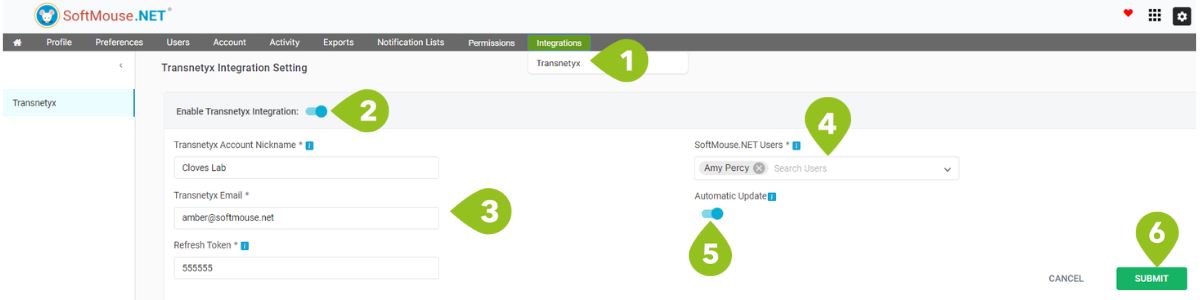
- On the Homepage, select 'Integrations' and choose 'Transnetyx'.
- Click the Enable Transnetyx Intergration switch
- Enter your Transnetyx account credentials:
- Create a Nick-Name for the Transnetyx Account
- Provide the email of your Transnetyx Account
- Enter your Refresh token. Follow these steps to acquire the refresh token
- Choose the SoftMouse.NET Users who will be able select and send order to this Transnetyx account
- To allow animal records to be updated automatically from the genotype results in Transnetyx, turn on the Automatic Update switch. Note: any existing genes would be replaced with the results from Transnetyx.
- Click Submit
All set! Now your Transnetyx account has been linked to your SoftMouse.NET account. You can now begin to create orders.
If you have any further questions, please contact us with your inquiry.