
Manage User Access to the Transnetyx Account
When setting up the Transnetyx API, you can choose the SoftMouse.NET users who will have access to the linked Transnetyx account. If at any time you want to add or remove users to your Transnetyx Account so that they can place orders in SoftMouse.NET using that account, follow these steps.
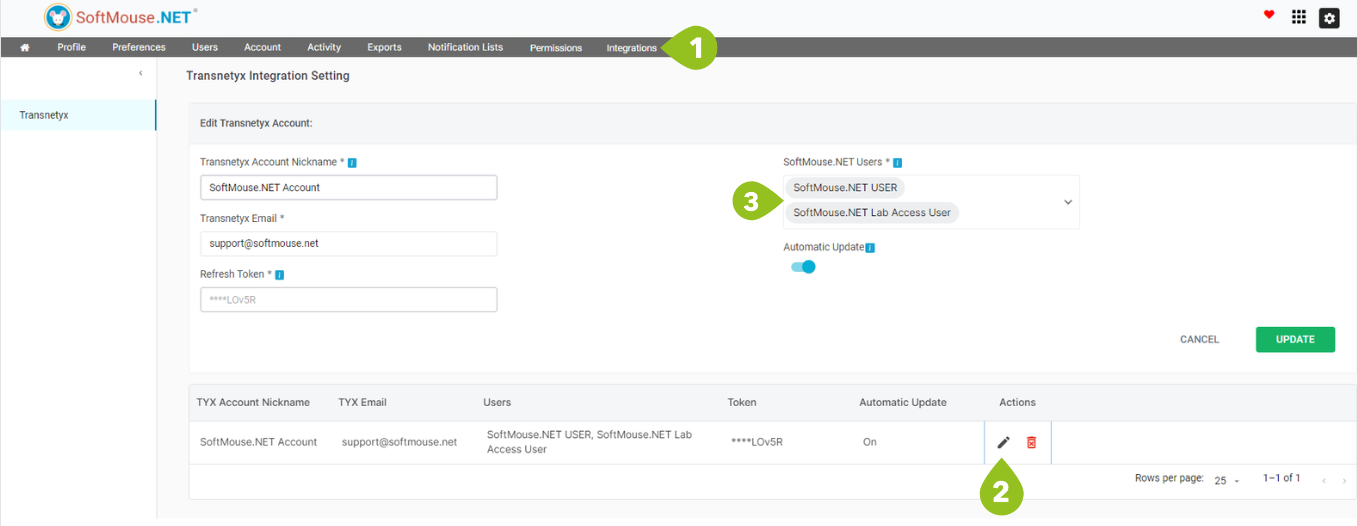
- On the Homepage, select 'Integrations' and choose 'Transnetyx'
- In the Linked Accounts Window, click the edit icon -- Note: you can only add users to the account if you created the Linked Account.
- Once you click on the edit Icon, the Edit Transnetyx Account window will populate with the Transnetyx Account details. You can now add or remove users, or modify any existing details regarding the Transnetyx Account.
If you have any further questions, please contact us with your inquiry.