
Upload Genotype Results
You will first need to download the results from your Transnetyx account.
Please ensure to export the results in the .csv format: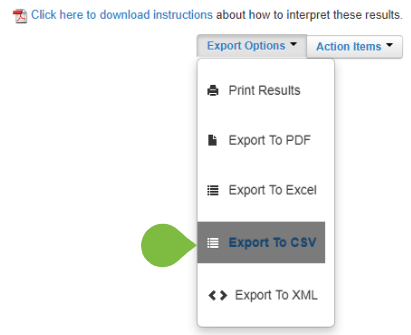
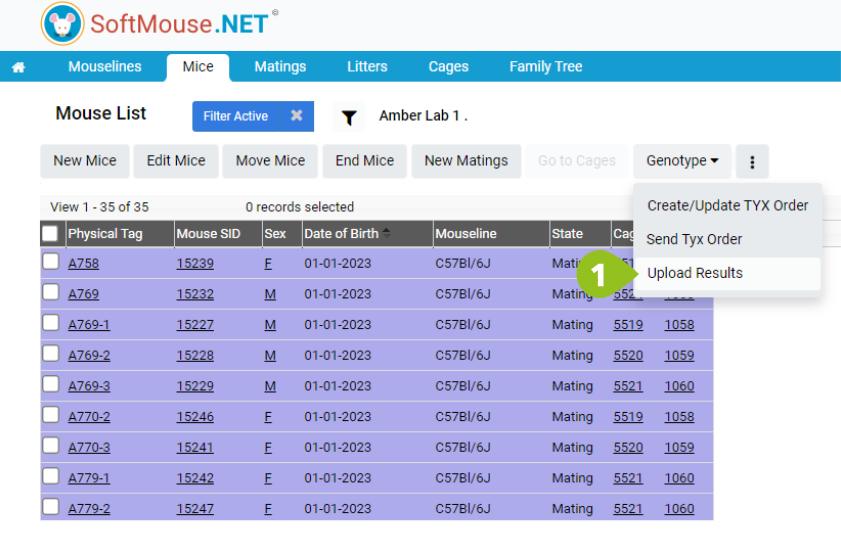
Then login to SoftMouse.NET, and on your Mouse or Litter List, follow these steps:
- Click the Genotype drop down, then the "Upload Results" button
- Under the drop down 'Please select a Genotyping Method' select from one of the three options:
- Transnetyx Results File: Select this if you have turned OFF the Transnetyx Integration
- Other Results File: Select this option if you have your results from another source, and want to use the SoftMouse.NET download results Template
- Transnetyx API: Select this option if you have turned ON the Transnetyx Integration
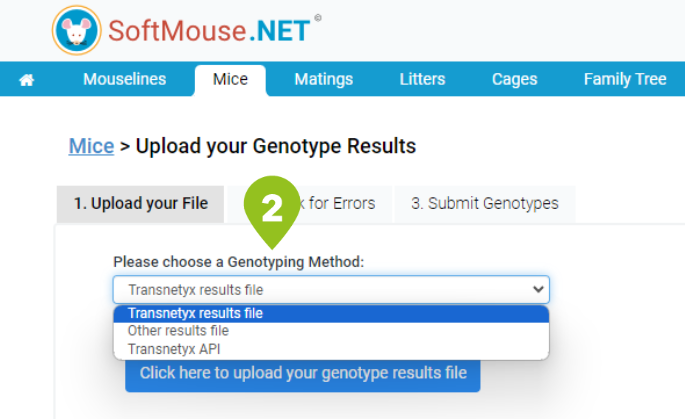
- Transnetyx Results File: Select this if you have turned OFF the Transnetyx Integration
- Click on "Click here to upload your file" and select your downloaded .csv results file
- Then click the "Check for Errors" button at the bottom right
Any errors found in your sheet will be listed and you can click "Back" to return to the previous page to correct any errors
Errors can include the following examples:
- No match between the Well Plate and Well Location is found in SoftMouse.NET. This can happen if you didn't first Generate the Order in SoftMouse.NET.
- No match is found between the Well Location and Mouse Identifier.
- You do not have permission to update the genotype of one of the mice listed in the sheet.
If you are unsure what the error relates to, please contact our support and we will gladly help you.
- If there are no errors, click "Proceed to Preview" button
- Review the mouse list preview and if all looks good, click "Submit Genotypes" at the bottom right
Done!
Back on your Mouse List the genotypes will be uploaded!
Note: All mentions of third party brand names or product descriptions are made strictly to illustrate compatibility. All brand names and logos are registered trademarks of their respective owners.
If you have any further questions, please contact us with your inquiry.