
How to Archive and Restore a Protocol
For expired protocols or inactive protocols, you can easily archive these records so that they no longer show in your main protocol drop downs.
Please follow these steps to archive a Protocol:
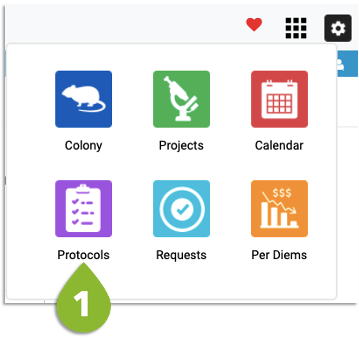
- Go to the Protocols List
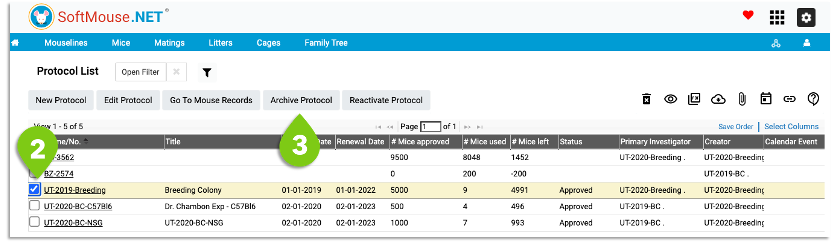
- Select the protocol from the Protocol List
- Click Archive Protocol
At any point, you can easily restore an archived Protocol as follows:
- Click Open Filter
- In the State Menu Select Archived and Filter
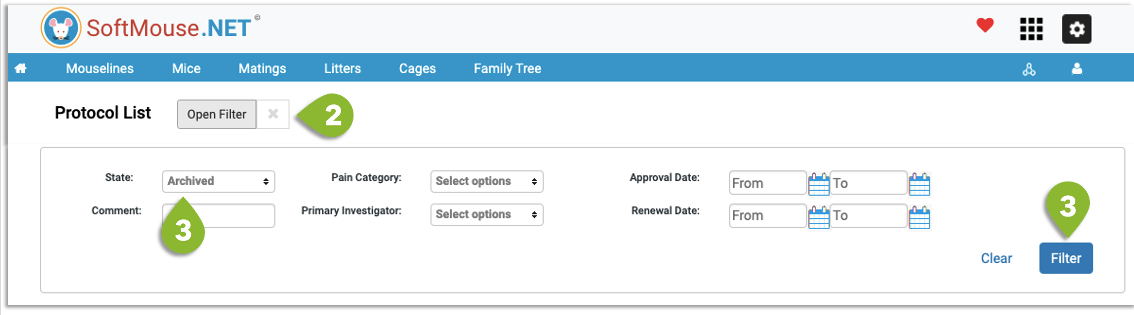
- Select the protocol
- Click Reactivate Protocol
Done! Now your Protocol will be restored to your active list and selectable as required to assign to mice.
If you have any further questions, please contact us with your inquiry.