
How to Create a New Protocol
To create a new Protocol, please follow these steps:
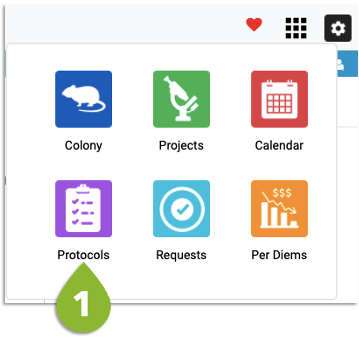
- Click the Modules menu and then the Protocols icons
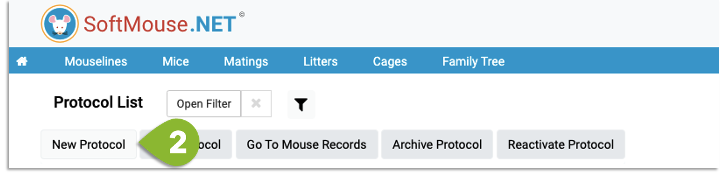
2. Click New Protocol
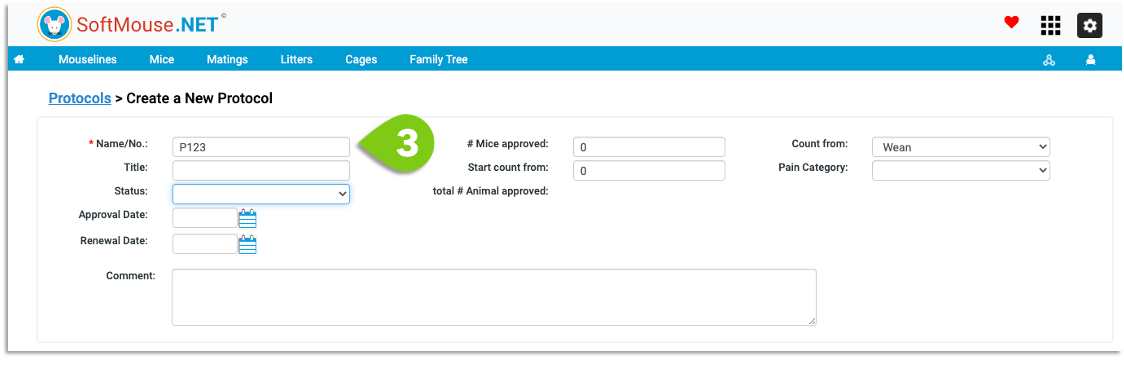
- Enter the Name/No of your Protocol --- All other fields are not required! Feel free to fill in other fields as required
- Click Save
Done!
A few fields of interest to point out:
- # Mice Approved indicates the number of allowed animals on your protocol
- Start Count From can be filled in if you have animals counted toward your protocol that are not in SoftMouse.NET
- Count From setting tells the system if you want to count the pups from birth towards the protocol or if you count them from weaning
- Key Contacts indicate all the personnel that are approved on your protocol
If you have any further questions, please contact us with your inquiry.