
Owner - Billing Code Associations
When managing multiple different Owners and Billing Codes, your corresponding list may get quite overwhelming.
SoftMouse.NET has now made it easier for you to personalize your account more than ever with the addition of associations.
Associations will allow you to better maintain your Owner and Billing Code information with organizing and pairing so that you can view the information that's most relevant for each Owner..
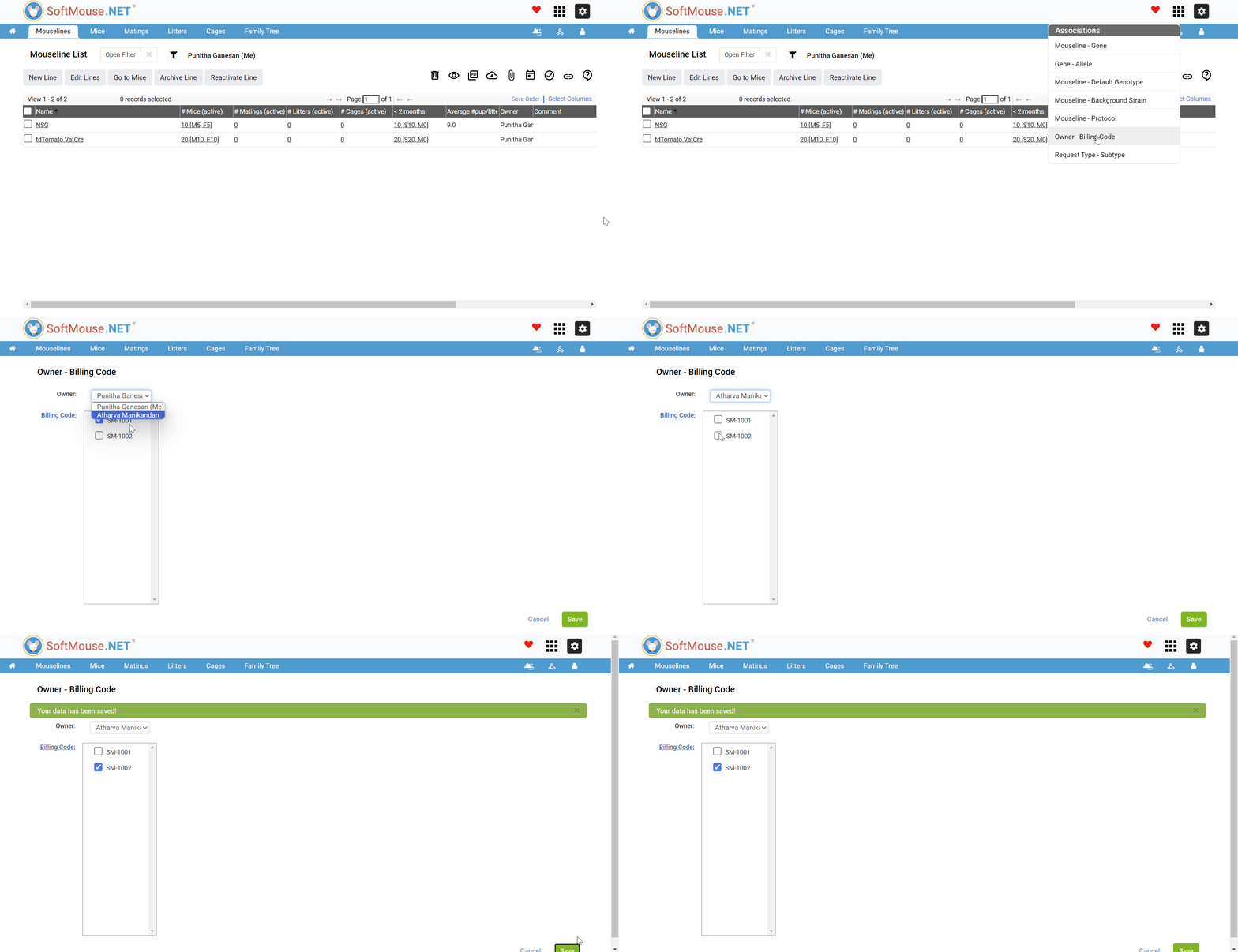
To create or edit a Owner - Billing Code association:
From any list after logging in:
- Go to the blue menu header and click on the small Association Icon on the upper right-hand side
- Click on "Owner and Billing Code" to create or edit an association
- From here, select the Owner for the corresponding association
- Next, click on the Billing Code that you would like to associate to a specific set or sets of Billing Code
- Follow up by selecting the Billing Code
- Finally, click on the green "Save" button to save your changes
If you have any further questions, please contact us with your inquiry.