
Count of Mice Alive on a Given Day
You need two filter searches on the Mouse List to pull this number:
- Filter #1: for mice that were alive on the day in question and are still alive today
- Filter #2: for mice that were alive on the day in question and are now ended
Please see below an example for July 1st.
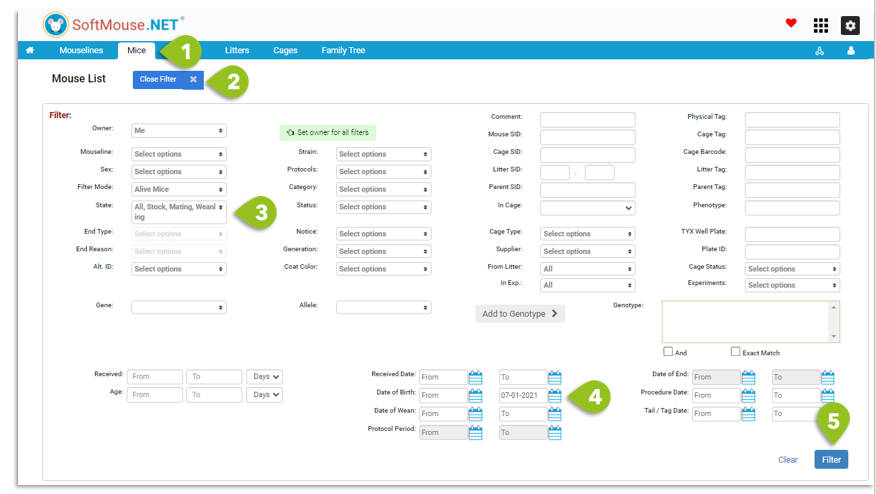
Filter #1: Animals alive on July 1st and still alive today
- Go to the Mouse List
- Click on Open Filter
- In the State dropdown, select All to include pups if needed, otherwise leave State as default (Mating, Stock, Weanling)
- Fill in the Date of Birth range as: From no value (blank) and To July 1st 2021
- Click on Filter
The number of alive animals today that were also alive on July 1st appears at the top left of the list.
Make a note of this total count, as we will subsequently add it to the result of Filter #2.
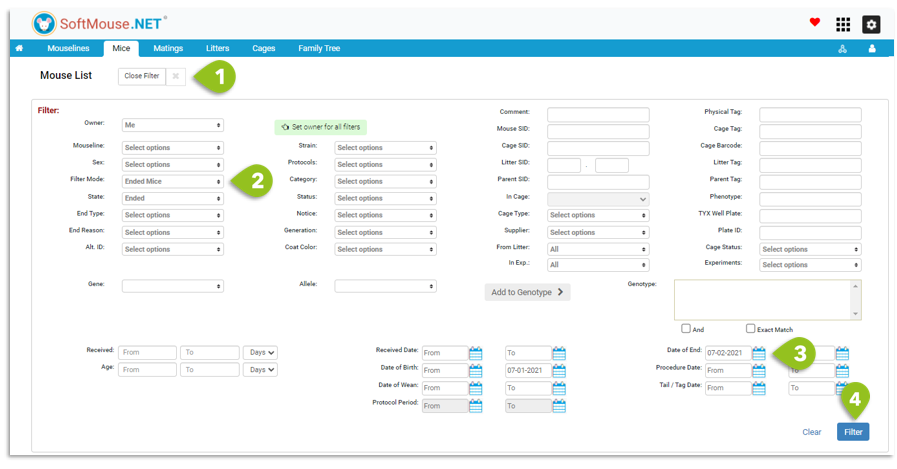
Filter #2: Animals alive on July 1st and now ended
- Click on Open Filter
- In the Filter Mode dropdown, select Ended Mice
- Fill in the Date of End range as: From July 2nd 2021 and To no value (blank)
- Click on Filter --- Note: the Date of Birth range should still be selected as To July1st 2021 as per Filter #1
The number of dead animals today that were alive on July 1st appears at the top left of the list.
To get the count of how many mice were alive on July 1st, use the formula below:
Alive Animals on July 1st = Count from Filter #1 + Count from Filter #2
Note: If you'd like a mouse count for every day of a period, you will need to perform these two filter searches for each day of the given period.
On an ongoing basis, at the end of your day, you can also simply make a daily note of the total alive mice from the Home Page. The filter could then be used in case you miss a day versus having to use it for every day.
If you have any further questions, please contact us with your inquiry.