
How to Add a Schedule to a Study?
Here are the steps to follow:
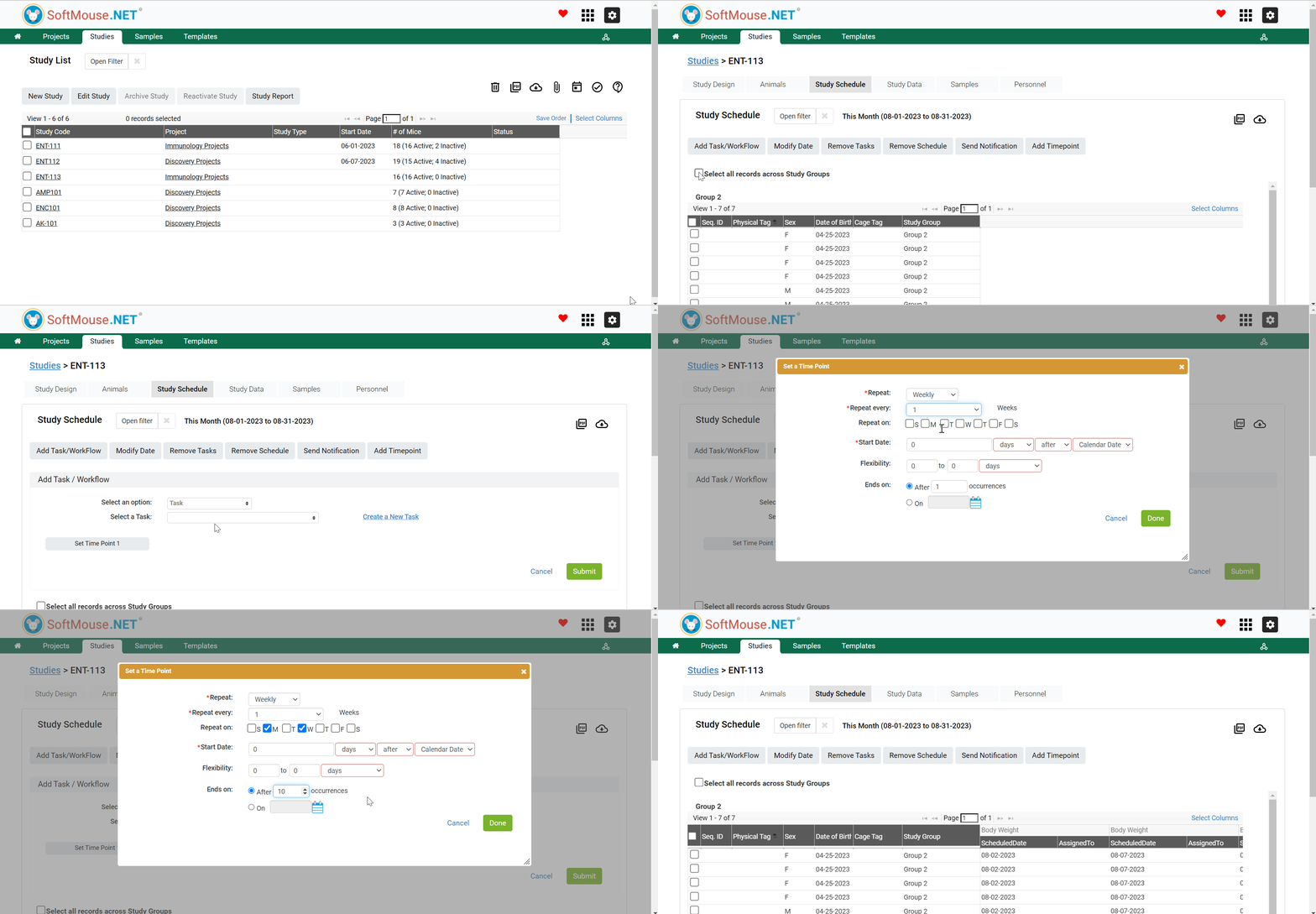
- On your Study list page, click the name of the Study of interest
- Click Study Schedule Tab
- Select Mice records you want to Add a Schedule to:
- Select all records across Study Groups
- Select all Animals in a given Group(s)
- Select some Animals individually - Click Add Task / Workflow
- In the Select an Option field, select Task or Workflow
- In the Select a Task / Workflow field, select the Task / Workflow of interest in the drop down list
- Click Set Time Point
- In the pop box, set the following criteria:
- Repeat: e.g. Daily
- Repeat Every:e.g. 2 days
- Start Date: e.g. 0 Days After Calendar date
- Flexibility: e.g. 0 0 Days
- Ends on: e.g. Select the End date of the study
- Click Submit
- Repeat steps 3-9 to add more Tasks / Workflows as needed
All done!
Following the aforementioned steps, a schedule will be added to the selected Animals and will show in the Table of Columns.
If you have any further questions, please contact us with your inquiry.