
How to Create a Workflow?
Here are the steps to follow:
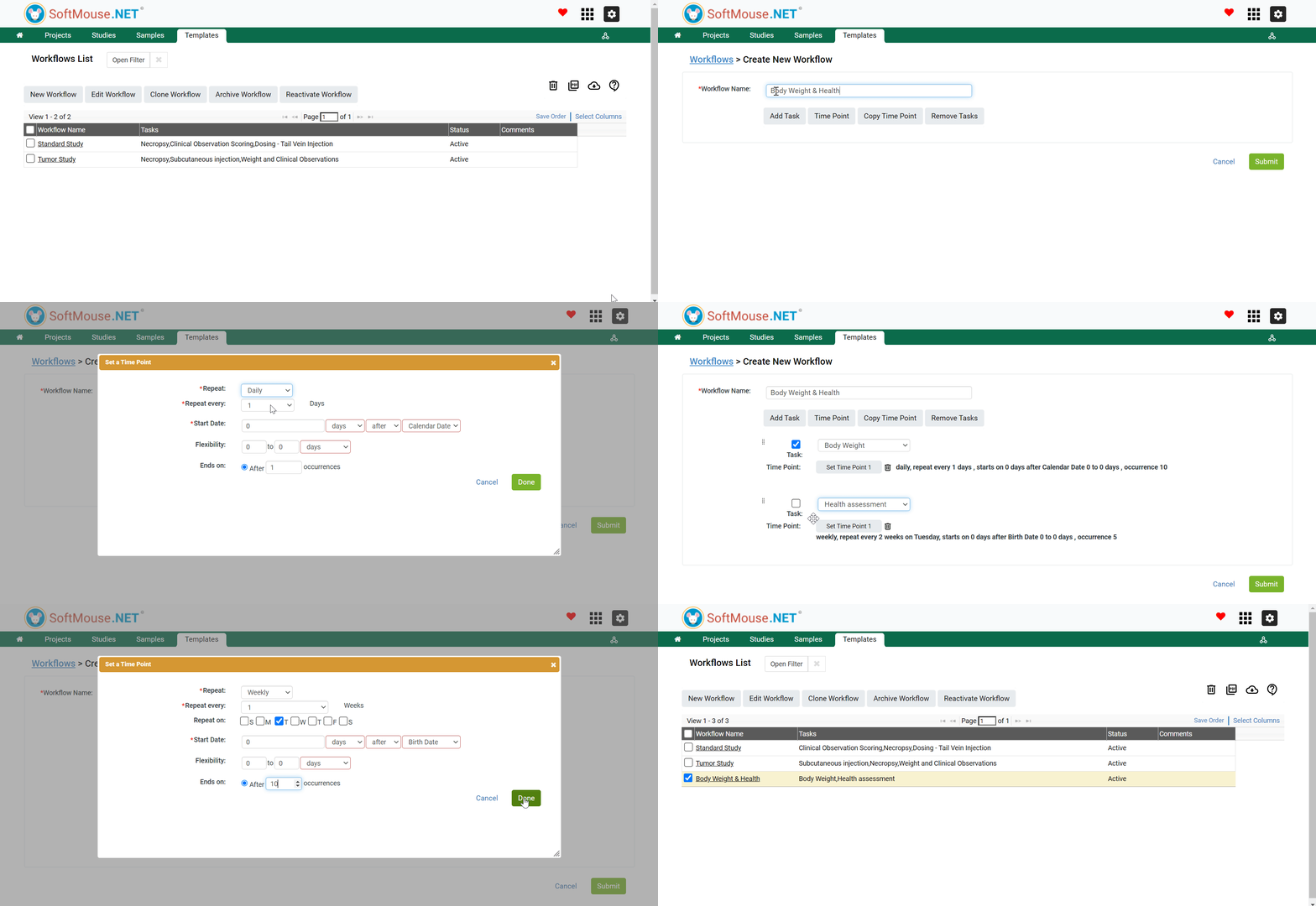
- In the Study Manager (Green tile labeled Projects), click the Templates tab in the green toolbar
- Click Workflows in the Templates submenu
- On the Workflow List page, click New Workflow
- In the Workflow Name field, enter your preferred Workflow name e.g. Workflow 1, Measurements, Group 1 Workflow etc.
- Click Add Task button
- In the now showing drop down list, select the first Task to be added to the Workflow
- Click Time Point button
- Click Set Time Point 1 to add the planned Time points for the first Task
- In the pop box, set the following criteria:
- Repeat
- Repeat Every
- Start Date
- Flexibility
- Ends on
- Click Done
- Repeat steps 5-10 to Add more Tasks to the Workflow
- Click Submit when all Tasks of interest have been added to the Workflow
Following the aforementioned steps, you would have created a New Workflow and added the required Tasks with their respective Time Points.
If you have any further questions, please contact us with your inquiry.